

AI for Software Project Estimation: 7 Ways to Improve Planning Accuracy in 2026
How delivery managers can use AI safely to identify hidden work, reduce estimation gaps, and build more realistic software project plans.
This guide covers how delivery managers and technical project managers can use AI for software project estimation, with safe prompts, risk checklists, QA scenarios, and effort range templates. All methods use sanitized inputs and are designed for real delivery teams.
Introduction
Most software estimates fail before development starts.
Not because teams are careless — but because estimates are built on incomplete information.
A feature looks simple during the first discussion. But once delivery begins, the real effort emerges through missed assumptions, hidden dependencies, QA edge cases, third-party delays, integration issues, and rework.
This is where AI for software project estimation changes the game.
According to a 2026 industry survey, 55% of project management software buyers said AI was the top trigger for their most recent purchase — not for novelty, but to tackle rising project complexity and the demand for speed.
AI does not replace the technical project manager or delivery team. It works best as a structured review layer that helps teams ask better questions before timelines are committed.
But one rule applies without exception:
Never share confidential requirements, client data, source code, credentials, financial details, or personal information with public AI platforms.
AI should be used with sanitized, generalized inputs only.
When used responsibly, AI helps delivery managers:
- Break requirements into detailed work packages
- Identify missing assumptions before planning starts
- Generate clarification questions for vague requirements
- Highlight risks and third-party dependencies
- Build more thorough QA estimation
- Compare against historical delivery patterns
- Create realistic low, medium, and high effort ranges
In this guide, we’ll walk through 7 practical ways to use AI for software project estimation — with ready-to-use prompts for each step.
→ Related reading: Software Project Estimation: Methods, Cost, Agile & Real Examples
Why Software Estimates Fail: The Visibility Problem
The root cause of most estimation failures is simple: teams estimate what they can see, and miss what they cannot.
A client says:
“Add OTP login to the mobile app.”
The team estimates:
- Login screen
- OTP input
- Resend OTP
- API integration
But actual delivery requires:
- OTP expiry and retry logic
- SMS gateway dependency and fallback
- Failed attempt handling and lockout
- Backend validation and security checks
- Slow network and timeout handling
- QA edge cases across device types
- Error message handling for all failure states
These invisible items don’t appear in the first estimate. They appear later as delays, firefighting, and scope disputes.
AI helps teams surface this hidden work systematically — before commitments are made.
Data Point: Why This Matters More in 2026
The scale of the problem is growing:
- 88% of organizations now use AI in at least one business function (McKinsey, 2025)
- 44% of teams rely on AI-assisted project management features for tasks like alerts, estimation, and status updates
- The AI-enabled PM software market is growing at a 40% compound annual growth rate
- Yet only 34% of organizations say they mostly complete projects on time and on budget (Wellingtone, 2025)
The gap between AI adoption and delivery performance is exactly where better estimation practices are needed. This guide closes that gap.
Before You Start: Protecting Project and Client Data
Before using any AI tool for estimation, data safety must come first.
Never share with public AI platforms:
- Client names or organization details
- Personal or user data
- Financial information or contract details
- Source code or database schemas
- API keys or credentials
- Production logs or internal architecture
- Security configurations or proprietary workflows
- Exact client requirements marked confidential
Always use sanitized, generalized inputs instead.
| Instead of this | Use this |
|---|---|
| “Integrate Razorpay for Client ABC’s premium membership app using this API flow…” | “Integrate a payment gateway into a mobile app with success/failure handling, refund flow, and webhook support.” |
| “Build the analytics dashboard for XYZ Corp showing their revenue by region” | “Build an admin dashboard with date filters, chart views, regional breakdown, and CSV export.” |
| “Estimate the login module for [Bank Name]’s mobile banking app” | “Estimate OTP-based login for a mobile app with retry limits, session handling, and biometric fallback.” |
Use AI as a thinking assistant. Not as a data store for project information.
Where AI Fits in the Estimation Process
AI is most valuable in the preparation phase — before the team commits to a timeline.
It supports:
- Requirement decomposition
- Hidden task identification
- Assumption documentation
- Risk and dependency surfacing
- QA scenario generation
- Historical pattern review
- Effort range building
AI should not produce the final estimate. That still comes from:
- Team judgment and collective experience
- Historical delivery data from your own projects
- Known technical complexity and constraints
- Risk buffer decisions
- Business priorities and phasing
Think of AI as the question-raiser, not the answer-giver.
→ Related reading: AI for Delivery Managers: 7 Ways to Improve Predictability and Risk Control
7 Ways AI Improves Software Project Estimation
1. Break Requirements into Work Packages
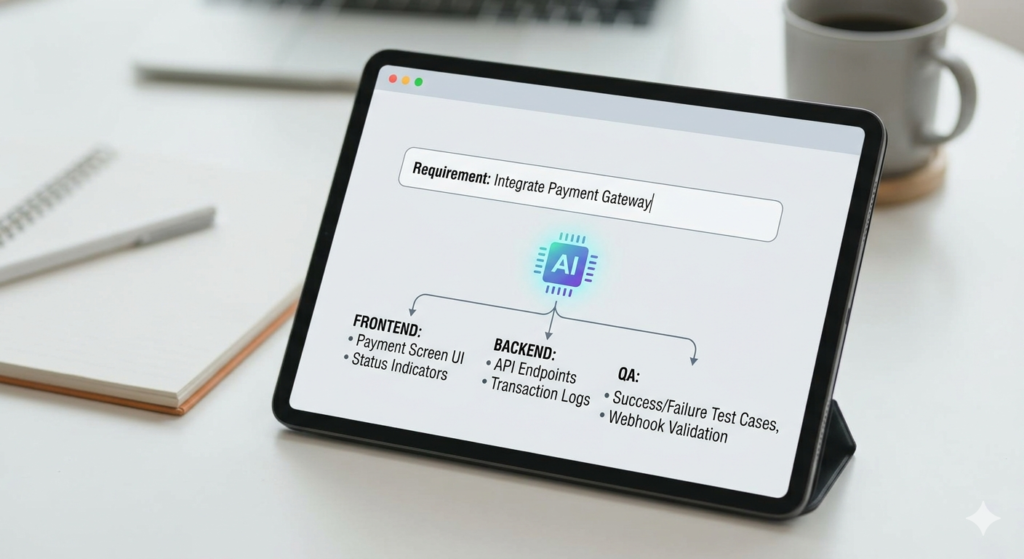
Many estimates fail because the requirement is never properly decomposed. A one-line feature description can hide 10 or more distinct workstreams.
Practical Example
Requirement: “Integrate a payment gateway into the mobile app.”
This sounds like a simple SDK task. But full delivery includes:
| Workstream | Examples |
|---|---|
| Frontend | Payment screen, loading states, error handling |
| Backend | Transaction records, status updates, reconciliation |
| Integration | SDK setup, webhook handler, callback management |
| QA | Success/failure/cancel/timeout/refund scenarios |
| Third-party | Provider sandbox, credentials, UAT coordination |
| Release | App Store compliance, security review, regression |
Safe AI Prompt
Act as a senior technical project manager.
Break down this generalized requirement into frontend, backend, QA, integration, dependency, deployment, and project management tasks.
Do not assume any confidential client-specific details.
Requirement: Integrate a payment gateway into a mobile app with success and failure handling, transaction status update, refund flow, and webhook support.
Output a table with: — Workstream — Task — Owner role — Estimation consideration — Possible dependency
How the PM Uses It
Review the AI output with your tech lead, backend developer, frontend developer, QA lead, and business stakeholder. The goal is not to accept AI output blindly — it’s to make sure no major workstream is missed before numbers are committed.
2. Identify Hidden Assumptions
Better estimates come from better questions asked earlier in the process. AI helps PMs systematically uncover what is vague or undefined in a requirement before planning starts.
Practical Example
Requirement: “Create an admin dashboard with reports.”
This sounds deliverable. But actual scope depends on:
- How many reports? What data sources?
- What filters are needed?
- Are exports required (PDF, CSV, Excel)?
- What role-based access levels exist?
- What chart types are expected?
- Is drill-down or pagination needed?
- What are the performance expectations on large data sets?
- Is the dashboard mobile-responsive?
Without answers, any estimate is a guess.
Safe AI Prompt
Act as a technical project manager preparing for an estimation discussion.
Generate clarification questions for this generalized requirement.
Do not request confidential data, client names, source code, credentials, or production information.
Requirement: Build an admin dashboard with reports, charts, filters, export, and role-based access.
Group questions under: — Business requirements — Data requirements — UI/UX requirements — Access control — Performance — Reporting and export — QA and testing
Identify the top 10 questions that must be answered before estimation.
How the PM Uses It
Use these in your discovery call or requirement review session. Instead of:
“This dashboard will take 10 days.”
You say:
“Before we can estimate, we need answers on: number of reports, data source, export formats, access control levels, and expected data volume.”
That is a stronger, more credible delivery conversation.
3. Generate Clarification Questions
Better estimates come from better questions.
AI can help PMs uncover vague requirements before planning starts.
Practical Example
Requirement:
“Create an admin dashboard with reports.”
This sounds simple, but it is vague.
The actual effort depends on:
- Number of reports
- Filters
- Export options
- Data sources
- Data volume
- Role-based access
- Chart types
- Drill-down views
- Performance expectations
- Mobile responsiveness
Safe AI Prompt
Act as a technical project manager preparing for an estimation discussion.
Create clarification questions for this generalized requirement.
Do not request confidential data, client names, source code, credentials, or production information.
Requirement:
Build an admin dashboard with reports, charts, filters, export, and role-based access.Group questions under:
– Business requirements
– Data requirements
– UI/UX requirements
– Access control
– Performance
– Reporting and export
– QA and testingPrioritize the top 10 questions that must be answered before estimation.
How the PM Should Use It
The PM can use these questions during discovery or requirement review.
Instead of saying:
“This dashboard will take 10 days.”
The PM can say:
“We need clarity on reports, filters, export formats, access control, data source, and expected data volume before confirming the estimate.”
That is a stronger delivery conversation.
4. Identify Risks and Dependencies
Estimation is not only about development hours. It also includes coordination time, waiting time, approvals, and external dependencies — all of which regularly cause delays.
Practical Example
Payment gateway integration typically depends on:
- Vendor sandbox access and test credentials
- Complete and accurate API documentation
- Client approval on refund and cancellation policy
- Security and compliance review
- Provider UAT support and availability
- App Store or Play Store submission requirements
If any of these are missed in estimation, the timeline becomes unrealistic.
Safe AI Prompt
Analyze this generalized feature for estimation risks and dependencies.
Do not use or request confidential project data, client details, credentials, source code, logs, or security information.
Feature: Payment gateway integration for a mobile app.
Identify: — Technical risks — Third-party dependencies — QA risks — Security risks — Release risks — Likely delay reasons
For each risk, provide: — Impact on estimate — Probability: Low / Medium / High — Suggested mitigation — Responsible owner
Example Risk Register Output
| Risk | Impact | Probability | PM Action |
|---|---|---|---|
| Payment credentials delayed | Blocks development start | High | Request credentials 1 sprint ahead |
| Refund scope undefined | Scope creep mid-sprint | High | Confirm phase 1 scope before sprint 1 |
| Webhook behavior unclear | Backend rework required | Medium | Schedule technical call with provider |
| Provider UAT delayed | Release date moves | Medium | Add 3–5 day dependency buffer |
| App Store compliance gap | Submission rejection | Low | Review payment guidelines during design |
How the PM Uses It
Add these risks to your estimation notes, risk register, assumption log, and client kickoff discussion. This gives the PM concrete justification for why the estimate needs a buffer — rather than just saying “it’s complex.”
5. Improve QA Estimation
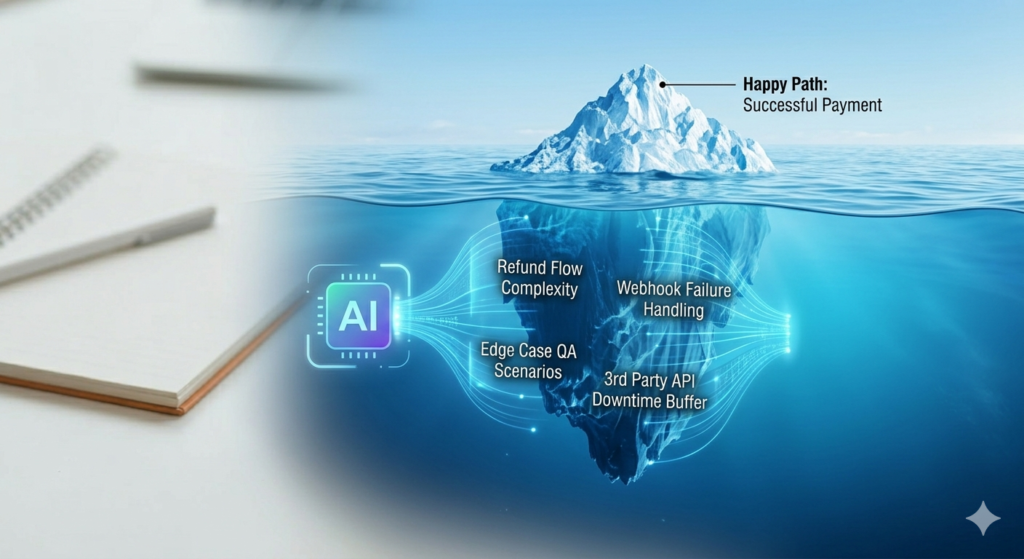
QA effort is consistently the most underestimated part of software delivery. Teams estimate development, but testing scope only becomes visible mid-sprint.
Practical Example
For payment gateway integration, QA is not just “test the happy path.” It includes:
| Test Category | Scenarios |
|---|---|
| Functional | Successful payment, correct receipt, status update |
| Negative | Failed card, insufficient balance, expired card |
| Edge cases | Timeout mid-payment, duplicate transaction, partial payment |
| Integration | Webhook receipt, backend status sync, reconciliation |
| Regression | Existing checkout flow, order history, notifications |
| Release | Smoke test on staging, payment on test device, store review |
That is 15–25 scenarios, not 2.
Safe AI Prompt
Create detailed QA scenarios for this generalized feature and estimate QA complexity.
Do not use confidential client data, production logs, credentials, source code, or real user information.
Feature: Payment gateway integration with success, failure, refund, cancellation, webhook, and backend transaction logs.
Group scenarios under: — Functional testing — Negative testing — Edge cases — Integration testing — Regression testing — Release validation
Also identify: — Which scenarios increase QA effort the most — Which scenarios require backend or provider support — Which scenarios may need third-party coordination
How the PM Uses It
Share the AI-generated QA scope with your QA lead. If the actual test scope is larger than originally estimated, revise the estimate before commitment — not after development ends.
This prevents the most common delivery failure pattern: development completes on time, but QA takes twice as long as planned.
6. Compare Against Historical Delivery Patterns
Past delivery data is one of the most reliable inputs for future estimates. AI can help you analyze patterns — but must be used without exposing confidential project data.
How to Anonymize Historical Data
Do not paste actual client names, proprietary feature names, internal project IDs, revenue numbers, contracts, or delivery reports into public AI tools.
Instead, summarize patterns like this:
Safe AI Prompt
Here are 3 anonymized past delivery patterns with actual effort:
- OTP login module Estimated: 5 days | Actual: 8 days Delay cause: SMS gateway setup and QA edge cases
- Payment gateway integration Estimated: 10 days | Actual: 18 days Delay cause: Webhook changes and provider UAT
- Admin reporting dashboard Estimated: 12 days | Actual: 20 days Delay cause: Unclear filter logic and export requirements
Now analyze this new generalized requirement: Subscription billing with payment gateway, invoice generation, retry payments, and cancellation flow.
Suggest: — Likely hidden effort areas — Risks similar to past patterns — Estimated effort range (low / medium / high) — Key questions to ask before committing to a timeline
What AI May Identify
AI may flag patterns like:
- Third-party integrations consistently exceed initial estimates by 60–80%
- QA scope for payment features is regularly underestimated
- Unclear business rules in billing features create mid-sprint rework
- External UAT coordination adds 3–5 days waiting time
- Invoice and reporting requirements expand scope in phase 1
How the PM Uses It
Use these pattern insights to challenge over-optimistic estimates with specific questions — before the sprint starts, not after the delay happens.
7. Create Low, Medium, and High Estimate Ranges

Fixed single-number estimates create false precision. Range-based estimation is more honest when requirements are partially defined or external dependencies exist.
Why Ranges Matter
Instead of:
“This will take 8 days.”
A delivery-focused estimate looks like:
“Based on current scope clarity, this feature will take 18–28 days. The range depends on refund scope confirmation, webhook complexity, provider UAT availability, and QA coverage depth.”
The range communicates professionalism, not uncertainty.
Safe AI Prompt
Based on the sanitized task breakdown below, suggest low, medium, and high effort ranges for each workstream.
Do not use confidential client data, source code, credentials, or production information.
Assume a team with 2–3 years of average developer experience.
Split effort by: — Frontend — Backend — Integration — QA — PM coordination — Dependency buffer
For each range, state: — Key assumptions — What risks push toward the high range — What must be clarified before locking the estimate
Task breakdown: [Paste sanitized task list here]
Example Output
| Area | Low | Medium | High |
|---|---|---|---|
| Frontend | 2 days | 3 days | 4 days |
| Backend | 4 days | 6 days | 8 days |
| Integration | 3 days | 5 days | 7 days |
| QA | 3 days | 5 days | 6 days |
| PM coordination | 1 day | 2 days | 3 days |
| Dependency buffer | 2 days | 4 days | 6 days |
| Total | 15 days | 25 days | 34 days |
How the PM Uses It
Present the range to stakeholders with assumptions attached:
“The low range assumes credentials are ready, refund scope is confirmed, and QA has test card access. The high range applies if provider UAT requires additional coordination or webhook behavior is undefined.”
This is a more credible and defensible delivery conversation.
Full Example: Payment Gateway Integration — Before and After AI
Initial Estimate (Without AI Review)
| Area | Estimate |
|---|---|
| UI changes | 1 day |
| SDK integration | 3 days |
| Backend transaction update | 2 days |
| QA | 2 days |
| Total | 8 days |
This looks clean. But it misses most of the actual delivery work.
What AI Surfaces (With Sanitized Prompts)
Missing items the AI review identifies:
- Sandbox setup and credential configuration
- SDK compatibility testing across OS versions
- Webhook handling and retry logic
- Failed, cancelled, and timeout payment flows
- Refund and reversal flow
- Transaction log and reconciliation
- Security review and compliance check
- Provider UAT coordination
- App regression testing
- Store release validation
Revised Estimate (With AI-Supported Review)
| Area | Range |
|---|---|
| Frontend | 2–3 days |
| Backend | 4–6 days |
| Integration | 4–6 days |
| QA | 4–5 days |
| Provider coordination | 2–4 days |
| Buffer | 2–4 days |
| Total | 18–28 days |
The Key Lesson
The first estimate counted coding effort. The revised estimate captures delivery effort.
That difference — systematically exposed by AI — is what prevents timeline overruns, stakeholder surprises, and team burnout.
Common Mistakes PMs Make When Using AI for Estimation
Avoid these patterns:
| Mistake | Why It Causes Problems |
|---|---|
| Treating AI output as the final estimate | AI doesn’t know your team, constraints, or history |
| Sharing estimates without team validation | AI misses context that experienced engineers catch |
| Using AI when requirements are still undefined | Garbage in, garbage out |
| Ignoring team skill level in the output | AI assumes average — your team may differ |
| Pasting confidential data into public AI tools | Data security and client trust violation |
| Accepting the first AI response without refining | Better prompts produce significantly better outputs |
| Skipping assumption documentation | Estimate looks confident but has hidden dependencies |
Safe AI Usage Checklist (Before Every Estimation Session)
Use this before pasting anything into an AI tool:
- Have I removed all client names and organization references?
- Have I removed credentials, API keys, and environment details?
- Have I removed source code and database schemas?
- Have I removed financial, contract, or pricing details?
- Have I removed personal data or user PII?
- Have I generalized all proprietary workflows?
- Have I anonymized historical project names and clients?
- Am I using an AI tool approved by my organization?
- Will the final estimate still be reviewed by the delivery team?
All nine checks should be true before you begin.
Recommended AI Estimation Workflow
Follow this sequence for every feature estimate:
- Sanitize the requirement — remove all confidential details
- Paste generalized requirement into your AI tool
- Request task breakdown across all workstreams
- Request assumption list — group by business, technical, QA, third-party
- Request clarification questions — prioritize top 10
- Request risk and dependency analysis — with probability and mitigation
- Request QA scenarios — across all test categories
- Request low / medium / high estimate ranges — with stated assumptions
- Validate with the delivery team — tech lead, QA, and backend
- Add risk buffer — based on identified dependencies
- Document assumptions and exclusions — attach to estimate
- Share the range, not a single number, with stakeholders
This process does not slow estimation down. It frontloads the conversations that would otherwise happen mid-sprint as surprises.
Ready-to-Use Prompt Pack for Project Managers
Copy and use these prompts directly. Replace bracketed placeholders with your sanitized requirement.
Prompt 1 — Task Breakdown
Break this generalized requirement into frontend, backend, QA, integration, deployment, dependency, and PM coordination tasks.
Do not assume any confidential client-specific details.
Requirement: [Paste sanitized requirement]
Output as a table: Workstream | Task | Owner role | Estimation consideration | Dependency
Prompt 2 — Assumption List
List all assumptions that may impact this estimate.
Use only the generalized requirement below. Do not request client names, source code, credentials, logs, or financial data.
Requirement: [Paste sanitized requirement]
Group under: Business | Technical | Third-party | QA | Deployment
Prompt 3 — Clarification Questions
Generate clarification questions that must be answered before estimation.
Use only the generalized requirement below. Do not request confidential project data.
Requirement: [Paste sanitized requirement]
Group by: Business | Technical | Data | UI/UX | QA | Release
Prioritize the top 10.
Prompt 4 — Risk and Dependency Analysis
Identify risks, dependencies, delay reasons, and estimation gaps.
Use only this sanitized feature description. Do not use confidential information.
Feature: [Paste sanitized feature]
For each risk: Impact | Probability (Low/Medium/High) | Mitigation | Owner
Prompt 5 — QA Scenarios
Generate QA scenarios and edge cases for this generalized feature.
Do not use production data, PII, credentials, or source code.
Feature: [Paste sanitized feature]
Group under: Functional | Negative | Edge cases | Integration | Regression | Release validation
Prompt 6 — Effort Range
Suggest low, medium, and high effort ranges with assumptions and risk factors.
Use only the sanitized task breakdown below. Assume a 2–3 year average developer experience.
Split by: Frontend | Backend | QA | Integration | PM coordination | Buffer
Task breakdown: [Paste sanitized task list]
FAQs
Can AI estimate software projects accurately?
AI can support estimation but should not be the final estimator. It helps identify hidden work, risks, assumptions, and effort ranges that delivery teams can then validate. According to industry data, AI can reach 85–95% accuracy on cost estimates and schedules — but the remaining precision gap requires human judgment.
How can AI improve software project estimation?
AI improves estimation by systematically decomposing requirements, identifying missing assumptions, generating pre-estimation clarification questions, flagging risks and dependencies, improving QA scope coverage, and suggesting realistic low-medium-high effort ranges — all before the team commits to a timeline.
Should project managers rely on AI estimates?
No. AI should be used as a review and discovery layer. Final estimates must be validated by the delivery team and adjusted for actual team skill level, known constraints, and historical delivery patterns specific to your organization.
Is it safe to share project requirements with AI tools?
Confidential or client-specific requirements should never be shared with public AI platforms. Always use sanitized, generalized inputs and follow your organization’s data security and AI usage policies before using any AI tool in the estimation process.
What is the best use of AI in estimation?
The best use is to surface hidden effort, QA scope, dependencies, and risk buffers before commitments are made — turning a vague one-line requirement into a full picture of actual delivery effort.
What AI tools can PMs use for project estimation?
General-purpose AI assistants like ChatGPT, Claude, or Gemini work well with carefully crafted sanitized prompts. For integrated PM workflows, tools like Jira (Atlassian Intelligence), ClickUp Brain, and Wrike’s Work Intelligence offer built-in AI-assisted estimation capabilities.
How do I estimate a software project more accurately?
Accurate estimation requires: breaking requirements into all workstreams (not just development); documenting all assumptions upfront; identifying third-party dependencies; building in a risk buffer based on historical patterns; and presenting a low-medium-high range rather than a single fixed number.
Closing Thought
The gap in software project estimation is almost never about effort calculation. It is about what the team did not know to ask before they started.
AI does not close that gap by being smarter than experienced engineers. It closes it by being systematic — asking every question, flagging every assumption, and mapping every dependency — before the sprint begins.
Used responsibly, with sanitized inputs and team validation, AI is the most practical tool available to delivery managers who want to build estimates that hold.
→ Continue reading: AI for Delivery Managers: 7 Ways to Improve Predictability and Risk Control
→ Related: Agile Metrics for Predictable Delivery
→ Deep dive: Software Project Estimation: Methods, Cost, Agile & Real Examples

Jawed Shamshedi is a Senior Technical Project Manager and Software Delivery Leader with 20+ years of experience in IT and 10+ years in technical project management. He holds PMP®, SAFe® 6 RTE, PRINCE2, and MCP certifications and has led software delivery across e-commerce, finance, healthcare, and SaaS domains. Based in New Delhi, working with clients worldwide.